HubSpot leads are watched against your response SLA.
SealRevenue turns new and updated HubSpot contacts into a manager-grade response board, with breach status, lag, recovery, and revenue proof in one place.
SealRevenue watches new HubSpot contacts, checks for first-touch activity, drives rep action in Slack, sends verified rescue emails with booking links when needed, and shows which saved leads made it back into pipeline and revenue.
Monthly from $1,000 • Annual from $10,000 • No seats • HubSpot + Slack only
A short view of the core flow: HubSpot monitoring, Slack rescue actions, CRM evidence logging, manager visibility, and revenue attribution.
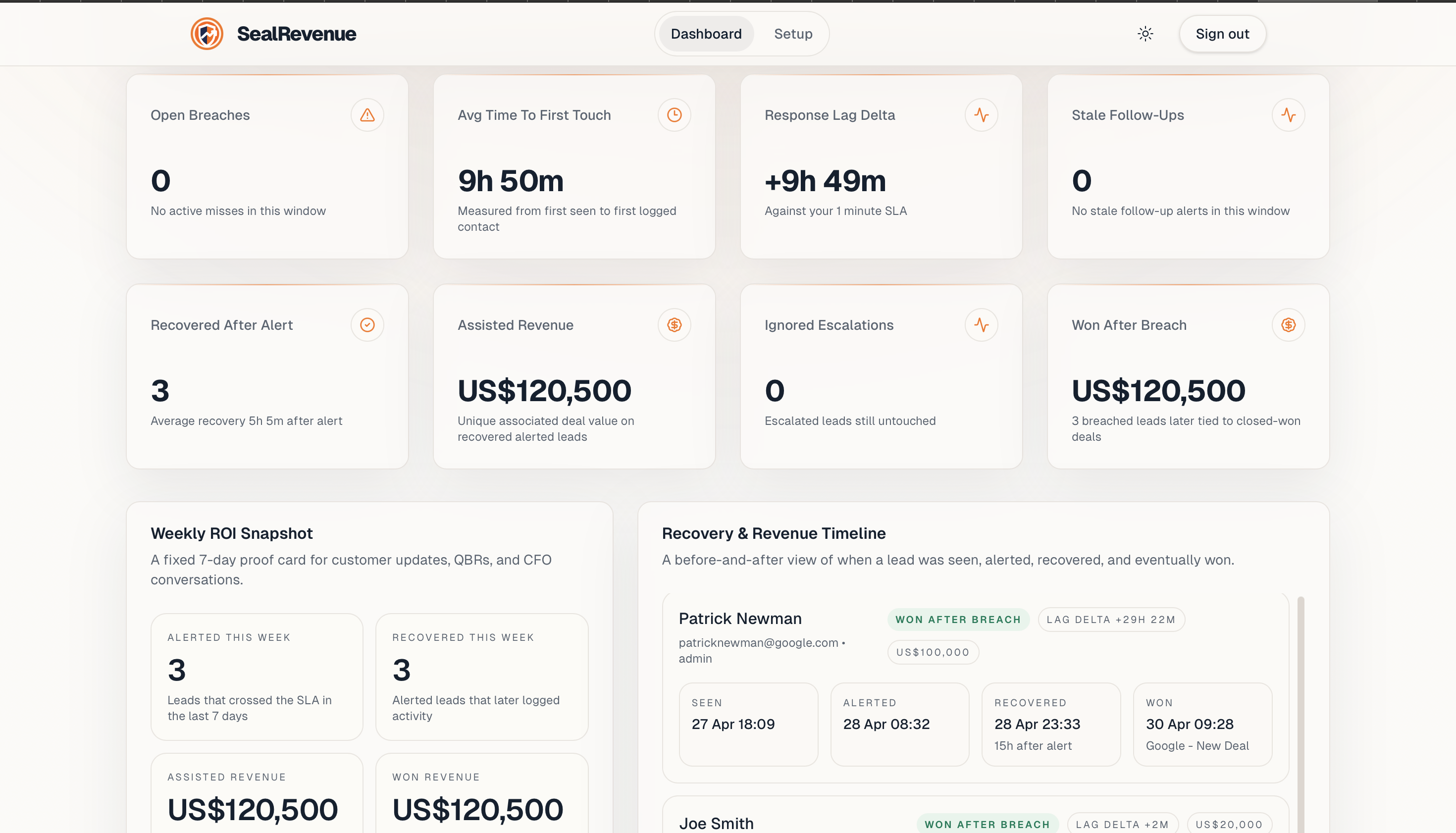
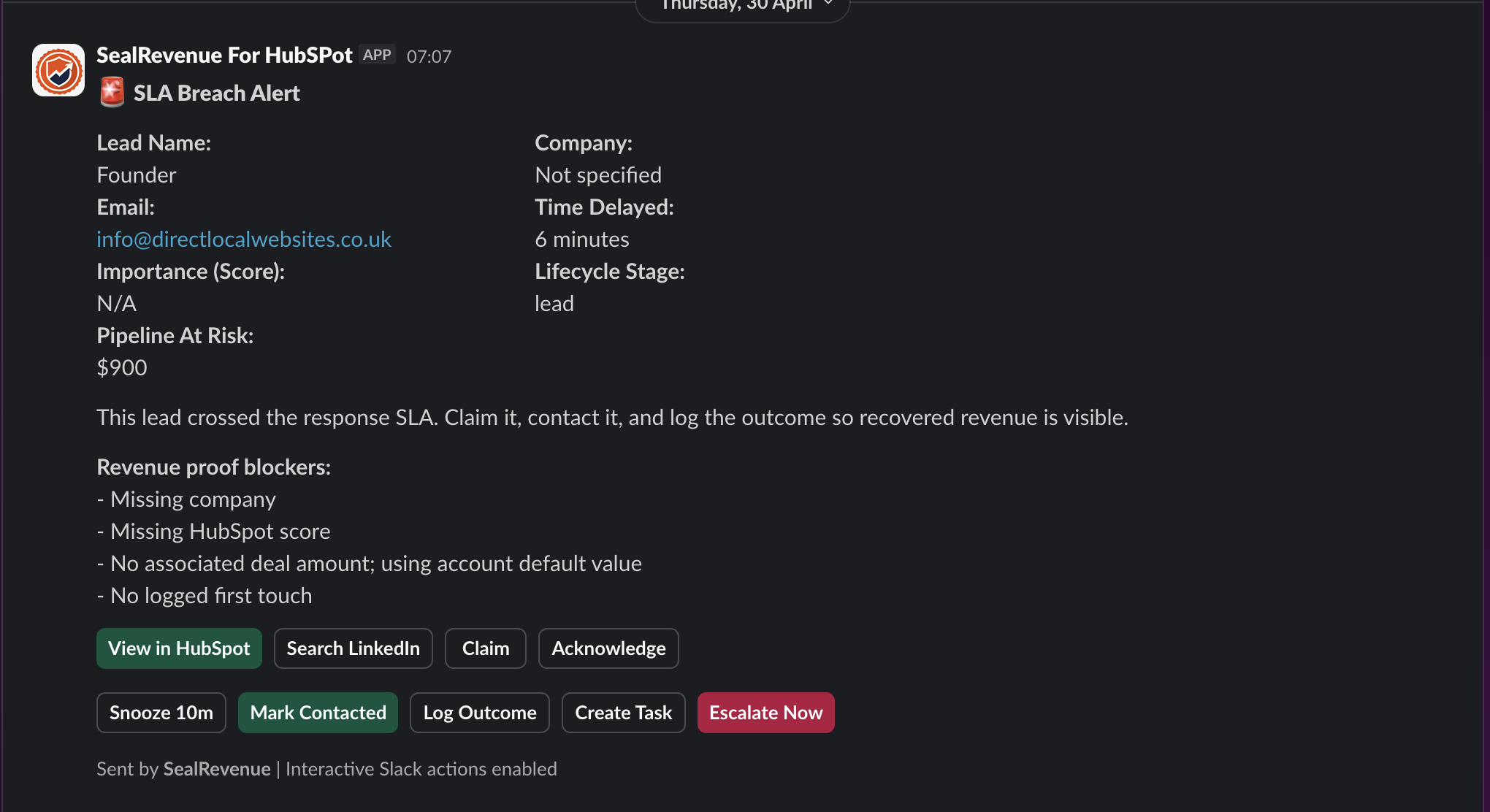
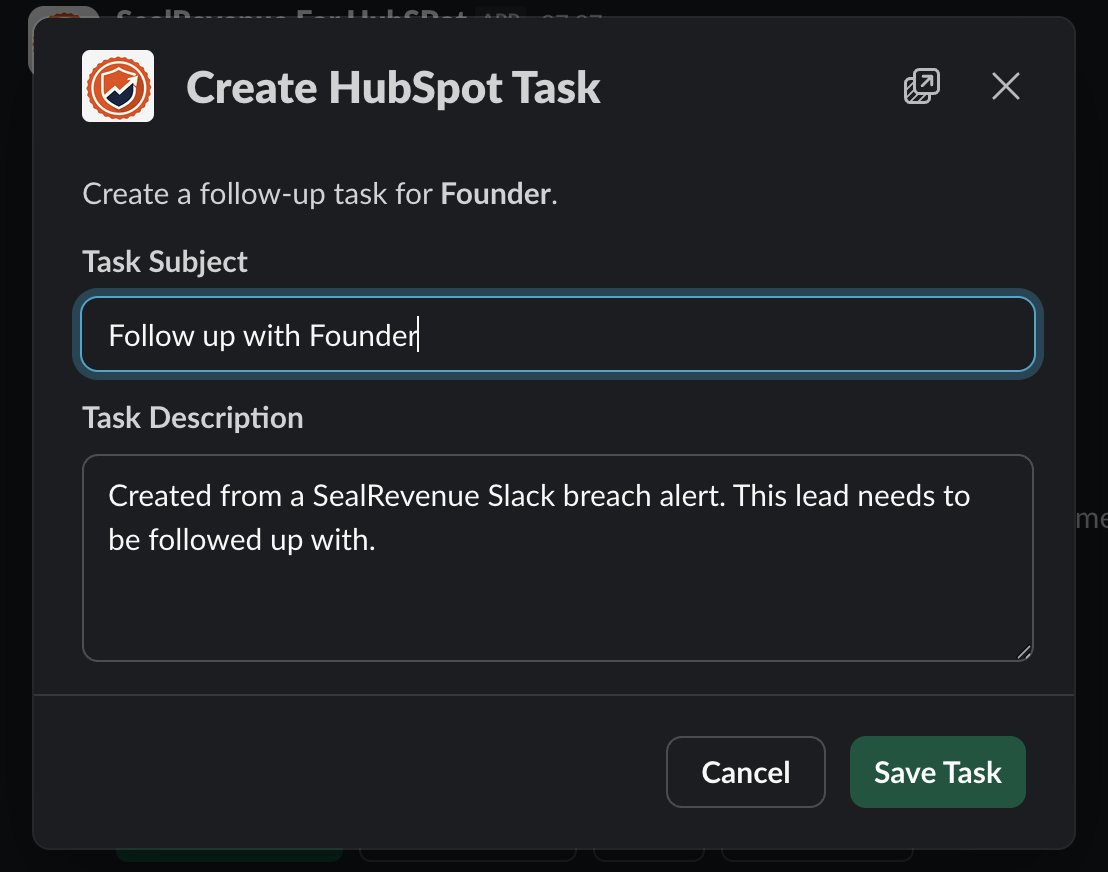
These are the surfaces that belong on the home page: the manager board, the Slack alert, the recovery controls, the HubSpot task handoff, and the weekly revenue proof.

SealRevenue turns new and updated HubSpot contacts into a manager-grade response board, with breach status, lag, recovery, and revenue proof in one place.

When a lead goes untouched, reps and managers get the context they need without checking HubSpot all day.

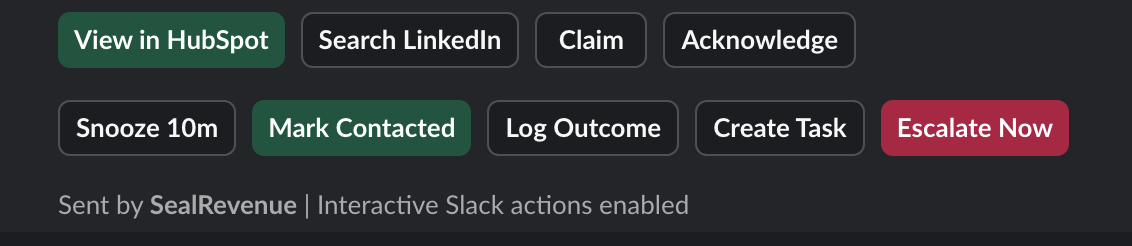
Claim, acknowledge, snooze, mark contacted, log outcomes, create tasks, or escalate directly from the response workflow.

Recovery work can be written back into the operating system your sales team already uses.

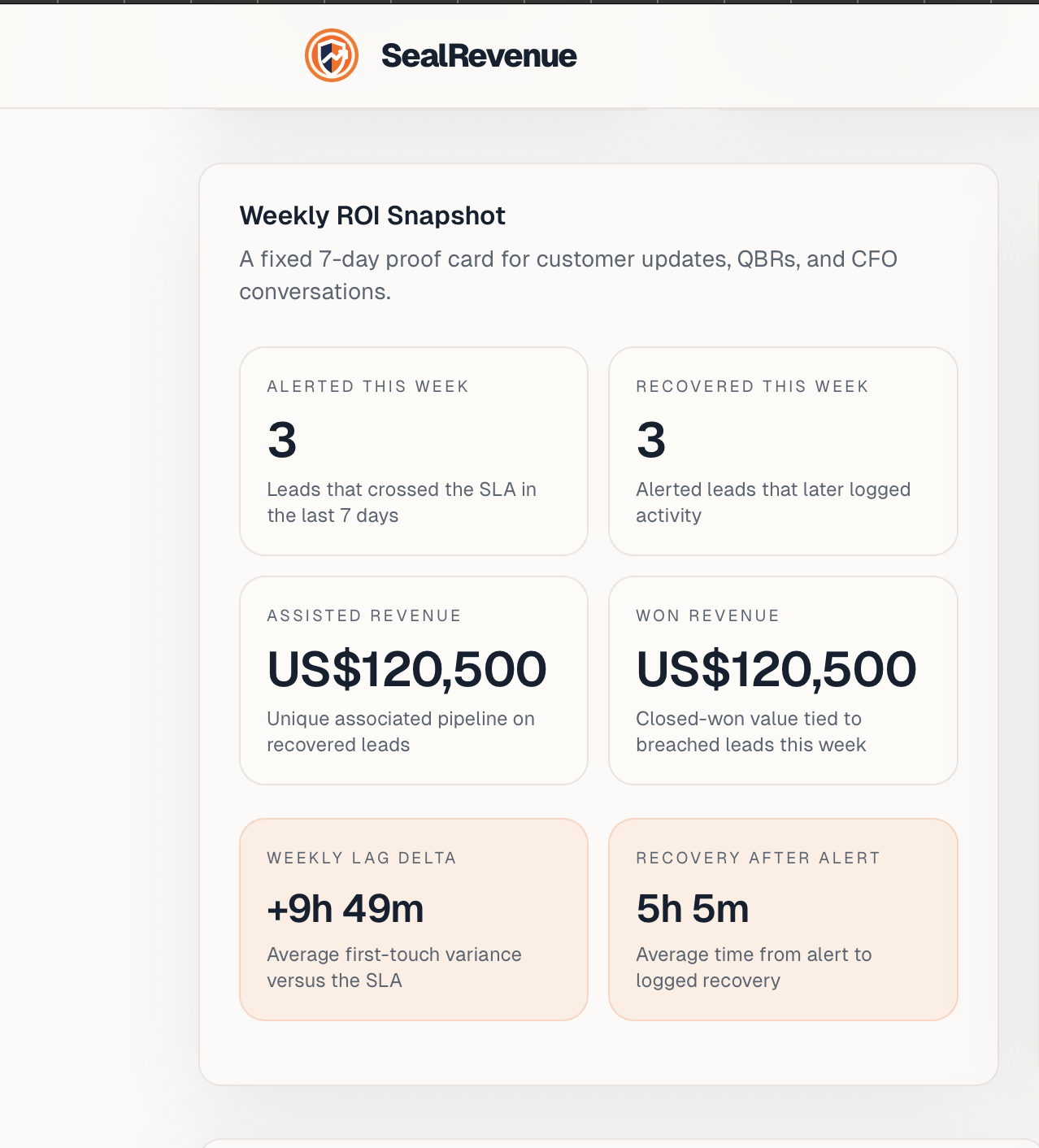
Review protected leads, recovered activity, lag delta, proof blockers, assisted revenue, and won revenue in a single update.
Use this as the simple product explanation: SealRevenue finds missed HubSpot revenue, Slack drives the rescue work, and HubSpot stays the record of truth.
Today, SealRevenue covers the SLA rescue layer: unavailable-owner flags, fallback owners, Slack reroute, and post-escalation reassignment. Full calendar OOO, territory routing, and workflow builders are future routing-layer features.
Connect HubSpot, install Slack, set the SLA window, choose business hours, and configure fallback owners before live monitoring starts.
Authorize the CRM and pick the Slack channels for alerts and manager escalation.
Control when a lead is considered late, including real-time or working-hours timing.
Mark unavailable owners and choose backups so missed leads have coverage.
Run an audit-only scan of historical HubSpot contacts and turn missed first-touch gaps into a report partners and leaders can understand.
Scans HubSpot for leads that missed the configured first-touch SLA.
Create a public audit link with client and partner names, optional email redaction, and ROI proof.
Shows pipeline at risk, dirty CRM fields, owner leakage, top sources, and high-recoverability leads.
SealRevenue separates real buyer-facing activity from CRM noise so teams do not count owner assignment, notes, or tasks as response.
Counts calls, sales emails, meetings, and communications. Ignores tasks and notes.
Ranks missed leads by intent, deal value, owner state, score, and recency.
Watches new HubSpot contacts after setup and starts the response timer automatically.
When a lead misses SLA, the Slack alert becomes the operating surface for the rep or manager to take action quickly.
Claim, acknowledge, snooze, mark contacted, create task, log outcome, bad-fit, or escalate.
Send or log buyer-facing recovery messages from the alert path.
Pushes ignored leads into a manager-visible channel after the escalation delay.
SealRevenue does not replace every HubSpot routing workflow, but it covers the post-assignment gap when the owner is unavailable or does not respond.
Managers can reassign a missed lead to a configured fallback owner from the alert.
If enabled, untouched escalated leads can be reassigned to a fallback owner.
Unavailable owners are flagged in alerts, audits, dashboards, and weekly recaps.
Dashboards and recaps show whether speed-to-lead discipline improved and whether recovered leads became pipeline or won revenue.
Compares the latest audit baseline with live monitoring performance.
Summarizes alerts, recoveries, meetings, won revenue, proof blockers, OOO risk, and reroutes.
Shows which leads were touched after alert and which deals later closed won.
SealRevenue keeps HubSpot as the system of record while Slack becomes the fast action layer.
Slack actions can create tasks, log recovery context, and update the contact owner.
Syncs associated deals, meetings after rescue, closed-won outcomes, and revenue source.
Highlights missing owner, company, source, deal amount, lifecycle stage, or first-touch evidence.
Recovery workflows help the team move fast without turning SealRevenue into a separate CRM or outreach database.
Use approved rescue copy and booking paths when a high-intent lead has gone untouched.
Flags leads that were touched once and then went quiet long enough to need another nudge.
Gives managers one place to see what still needs action right now.
SealRevenue sits between inbound contact volume and pipeline loss: detect the miss, trigger action, escalate the risk, and prove what was recovered afterward.
Run audit-only scans, create shareable co-branded reports, show pipeline at risk, and rank the highest-recoverability missed leads before live monitoring starts.
SealRevenue watches HubSpot for real buyer-facing calls, sales emails, meetings, and communications while ignoring tasks, notes, and CRM noise.
Breaches land in Slack with actions to claim, acknowledge, snooze, mark contacted, send recovery, create tasks, log outcomes, or escalate.
Mark owners unavailable, configure fallback owners, reroute from Slack, or auto-reroute ignored escalations back into HubSpot ownership.
Surface missing owner, company, source, lifecycle, deal amount, and first-touch evidence, then score which missed leads are most worth rescuing.
Compare the audit baseline with live monitoring, then track recovered-after-alert activity, meetings, won-after-breach revenue, and weekly ROI.
The short version of how SealRevenue works, what it watches, what it changes operationally, and how pricing is structured.
Choose monthly from $1,000 or annual from $10,000
in your selected region. No seats, no per-rep tax, and no extra module just to prove ROI.
SealRevenue watches HubSpot leads, escalates missed response windows in Slack, and shows whether your team actually recovered the pipeline afterward.